Google Demand Gen campaigns solve this problem. They reach potential customers across YouTube (including Shorts), Discover, Gmail, and the Google Display Network-before they ever search for you. This guide walks through what Demand Gen campaigns are, where your ads appear, how to build creative and audience strategies, budget and measurement guidance, and how to avoid the most common mistakes.
TLDR
- Demand Gen reaches users on YouTube (including Shorts), Discover, Gmail, and Google Display Network-before they search
- Unlike Search campaigns that capture existing intent, Demand Gen creates demand by targeting passive browsers with high-quality images and video
- Minimum recommended budget: $20–30/day; expect a 2–4 week learning phase and 60–90 day evaluation window
- Creative quality and audience targeting are the biggest performance levers; AI bidding optimizes only once you feed it the right signals
What Is Google Demand Gen and Where Do Your Ads Appear?
Google Demand Gen is an AI-powered campaign format built to generate interest before people start searching, reaching them while they browse, watch, and discover content across Google's highest-traffic surfaces. It officially replaced Video Action Campaigns (VAC) in 2025, with the final VACs automatically upgraded by April 2026.
Placement Coverage and User Reach
Demand Gen ads appear across:
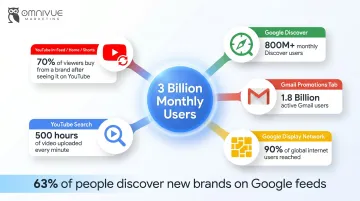
- YouTube in-feed, Home Feed, Watch Next, and YouTube Search, users browsing recommendations and related videos
- YouTube Shorts, now supporting 9:16 vertical image and video formats for the platform's over 50 billion daily views
- Google Discover, the personalized content feed on Android and Chrome, where users discover content based on interests
- Gmail Promotions tab, reaching users while they manage their inbox
- Google Display Network, over 90% of the global internet population across 3M+ sites and apps
Combined, these placements reach up to 3 billion monthly active users. According to Google-commissioned Ipsos research, 63% of consumers discover new products or brands on Google feeds, and among those, 91% took action immediately.
How Demand Gen Differs From Traditional Advertising
Those engagement rates reflect a fundamental format difference. Unlike keyword-based Search campaigns, Demand Gen is visual-first and audience-first, Google's AI determines the best creative and audience combination for each placement in real time, drawing from signals like browsing behavior, interest graphs, and past purchase intent.
For businesses trying to grow beyond their existing customer base, that distinction matters. Search caps you at people already aware of a solution. Demand Gen reaches people who don't know they need you yet.
| Search Campaigns | Demand Gen | |
|---|---|---|
| Trigger | User types a query | Audience signal / behavior |
| Creative format | Text-based | Visual (image, video) |
| Audience control | Keyword intent | Interest graph + lookalikes |
| Funnel stage | Primarily bottom-funnel | Mid- to upper-funnel |
Key Features That Make Demand Gen Distinct
- Optimizes bids automatically for conversions, CPA, or ROAS across the full funnel
- Builds lookalike segments from your existing customer lists to reach net-new prospects
- Runs native creative A/B experiments without leaving the platform
- Connects product feeds so retailers can dynamically showcase inventory
- Measures incrementality through Brand Lift, Search Lift, and Conversion Lift studies
Demand Gen vs. Performance Max vs. Display Campaigns
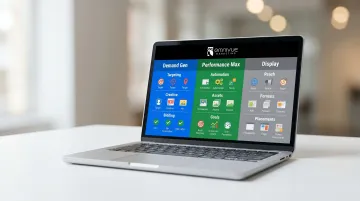
| Feature | Demand Gen | Performance Max | Display |
|---|---|---|---|
| Primary Use Case | Generate demand on visual, entertaining surfaces | Maximize performance across all Google channels | Reach relevant audiences browsing websites and apps |
| Funnel Stage | Top and mid-funnel | Full funnel | Top and mid-funnel |
| Audience Control | Hard targeting (Custom segments, Lookalikes) | Audience signals (steers AI, no hard targeting) | Contextual and audience targeting |
| Channel Coverage | YouTube, Discover, Gmail, GDN | All Google Ads inventory | GDN (35M+ sites/apps) and Google properties |
| Best For | Brands building awareness and consideration with specific audience control | Advertisers maximizing cross-channel performance with full automation | Simple reach campaigns with basic targeting needs |
When to Choose Demand Gen Over Display
Demand Gen pulls ahead of traditional Display on several dimensions:
- Premium placements across YouTube, Gmail, and Discover, not just the GDN
- Lookalike segments for reaching audiences that mirror your best customers
- Richer creative formats including video, carousel, and product feeds
- Stronger AI optimization built around visual and intent signals
As of 2025, Display inventory is now available inside Demand Gen, so you get both premium and broader reach within one campaign type.
Advertisers who added Google Display Ads to their Demand Gen campaigns saw an average +16% lift in conversions.
Combining Demand Gen and Search for Maximum Impact
The strongest use case for Demand Gen is pairing it with Search campaigns. Demand Gen fills the top and middle of the funnel, builds brand awareness and consideration, and then Search captures the bottom-of-funnel intent it helped create. Don't replace Search with Demand Gen. Stack them, and each campaign makes the other more effective.
Creative Strategy: What Actually Works on Demand Gen
Demand Gen success hinges on creative execution. Users on YouTube, Discover, and Gmail are in a passive, distracted mindset-your ad has to interrupt the scroll before it can do anything else.
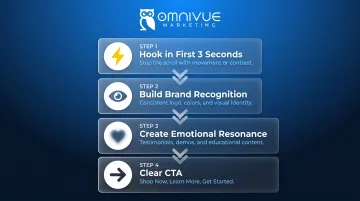
The Four-Part Creative Framework
- Hook in the first 3 seconds, Movement, contrast, or a direct question stops the scroll. You have one shot before the user moves on.
- Build brand recognition, Logo, consistent colors, and visual identity across placements so users connect the ad to your brand.
- Create emotional resonance, Educational content, testimonials, and product demos outperform generic creative. Make viewers feel or think something.
- Close with a clear CTA, "Shop Now," "Learn More," "Get Started." Tell viewers exactly what to do next.
Video Creative Specifications and Best Practices
- Length: 30 seconds or less; 15-second cutdowns perform well for retargeting
- Mobile-first framing: Use 9:16 vertical format for Shorts
- Engaging hook: Google recommends captivating viewers in the first 5-10 seconds with a problem statement and solution
- Content types to test: Educational/how-to, testimonials, product demonstrations, behind-the-scenes
Affordable smartphone-shot video regularly outperforms over-produced content on these platforms. According to Google data, creator partnerships on YouTube Shorts delivered a 30% increase in conversion lift while maintaining CPA efficiency.
Image Creative Specifications
Video specs set the foundation; image creative follows similar logic. Authenticity matters more than production value here too.
- Formats: Landscape (1.91:1), square (1:1), portrait (4:5), and vertical (9:16)
- Quality: Good lighting, minimal text overlay, strong brand prominence
- Authenticity: Avoid generic stock photography, authentic visuals outperform
Ad Copy Requirements
- Headlines: Up to 5 headlines, 40 characters each
- Descriptions: Up to 5 descriptions, 90 characters each
- Approach: Craft benefit-focused, conversational copy that addresses customer pain points rather than technical jargon
Creative Testing Approach
Test one variable at a time across three categories:
- Content type: Educational vs. testimonial vs. product-focused
- Format: Video vs. image vs. carousel
- Placement: YouTube vs. Discover vs. Gmail
Use Google's built-in Creative A/B experiments feature. What works on YouTube Shorts may perform differently on Gmail-optimize assets per surface.
Audience Targeting and Campaign Structure Best Practices
Demand Gen is audience-first, meaning targeting decisions drive performance more than any other factor.
Start With Audience Definition
Before configuring any targeting, define:
- Who the audience is (demographics, interests, behaviors)
- What action you want them to take (awareness, consideration, conversion)
- Where they currently get information (YouTube, Gmail, Discover)
- Why they would care about your message (pain points, desires)
Matching creative to the audience's funnel stage separates effective campaigns from wasted spend.
Core Audience Targeting Options
1. Custom audiences
Built from keywords, URLs, or apps-highest specificity and control, best for targeting in-market signals.
2. Lookalike segments
Reach new prospects who share characteristics with existing customers, website visitors, or video viewers. As of March 2026, Lookalike segments transitioned from strict similarity thresholds to AI-driven audience suggestions, allowing Google to expand beyond defined thresholds if it improves outcomes.
3. Affinity and In-market audiences
Broader reach for users with relevant interests or who are actively researching a category.
Campaign Structure Best Practices
- Separate prospecting and remarketing campaigns, they need different goals, budgets, and creative messaging
- Consider placement-specific campaigns, e.g., a Shorts-only campaign for mobile-first vertical video
- Run campaigns for at least 30 days before iterating, the algorithm needs time to learn
Conversion Tracking Setup
Demand Gen campaigns rely heavily on conversion signals to optimize effectively. Start with lightweight conversion events like "Add to Cart" or "Site Visit" in early stages, these give the algorithm enough signal without waiting for lower-funnel actions. Server-side tracking or Enhanced Conversions will improve signal quality and should be configured before launch.
Getting this infrastructure right before launch matters, bad tracking means the algorithm optimizes toward the wrong signals. Omnivue Marketing builds conversion tracking into campaigns from day one. The proprietary OmniTrack Analytics Platform delivers cross-platform attribution modeling that connects Demand Gen performance to revenue outcomes across the full funnel.
Budget, Bidding, Measurement, and Optimization
Budget Guidance
- Minimum starting budget: $20–30/day ($600–900/month) to generate enough data for the algorithm to optimize
- Target CPA campaigns: Google recommends setting a daily budget at least 10x your target CPA
- Max Conversions / Max Conversion Value: Recommended daily budget is at least $100/day per campaign
Underfunding campaigns leads to poor optimization and misleading results during the learning phase (2–4 weeks). Evaluate performance trends monthly rather than reacting to daily fluctuations.
Bidding Strategy Options
- Maximize Clicks: For early-stage traffic and awareness goals
- Maximize Conversions: For lead generation and conversion-focused campaigns
- Target CPA or Target ROAS / Value-based bidding: For campaigns with established conversion history
Start with Maximize Conversions until you collect enough conversion data (typically 50+ conversions) before switching to Target CPA.
The Measurement Challenge
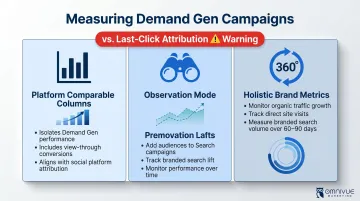
Last-click attribution severely undervalues Demand Gen's contribution since these campaigns operate earlier in the funnel. Research using multi-touch attribution found that mid-funnel channels could be credited with driving 16X more sales compared to a last-click model.
Three better measurement approaches:
Platform Comparable columns, Google's conversions (Platform Comparable) column isolates Demand Gen campaigns and factors in view-through conversions (VTC), assigning full credit to the last Demand Gen interaction. This aligns with social ad platform attribution, enabling fair cross-platform comparisons.
Observation mode, Add Demand Gen audiences to Search campaigns and track branded search lift over time.
Holistic brand metrics, Monitor overall channel growth (organic traffic, direct visits, branded search volume) to infer awareness impact over a 60–90 day window.
For teams needing cleaner cross-funnel visibility, a dedicated attribution layer, like Omnivue Marketing's OmniTrack Analytics Platform, can surface how Demand Gen contributes to revenue beyond what last-click models report.
Top Optimization Mistakes to Avoid
- Pausing campaigns before 30 days, the algorithm needs data to learn
- Judging Demand Gen by Search-level ROAS, these are different funnel stages with different return profiles
- Making multiple changes at once, prevents isolating what is actually working
Set a 60–90 day evaluation window as the realistic benchmark for meaningful results.
Frequently Asked Questions
What is Demand Gen on Google Ads?
Demand Gen is Google's AI-powered, visually-driven campaign format that shows image and video ads to users while they browse YouTube, Discover, Gmail, and the Google Display Network-targeting people based on interests and behavior rather than active search queries.
How does Demand Gen differ from Performance Max and Display campaigns in Google Ads?
Demand Gen targets specific audience segments on visual surfaces with audience-level control; Performance Max automates across all Google channels with less advertiser control; traditional Display offers simpler targeting and fewer formats but is now accessible as inventory within Demand Gen itself.
How do you optimize a Demand Gen campaign in Google Ads?
Consistent optimization comes down to four practices:
- Test creative formats and messaging one variable at a time
- Keep prospecting and remarketing in separate campaigns
- Let campaigns run at least 30 days before making changes
- Measure with view-through conversions or brand lift, not last-click attribution alone
Is $20 a day a good budget for Demand Gen campaigns on Google Ads?
$20/day is the floor, but $30+/day ($900+/month) gives Google's algorithm enough data to optimize effectively. For Target CPA campaigns, the budget should be at least 10x the target CPA.
Is Demand Gen on Google Ads worth it for advertisers?
Demand Gen works well for brand building, entering new markets, and nurturing prospects who haven't searched yet. It requires patience (60–90 days), quality creative, and sufficient budget to see results. Businesses focused on immediate conversions get the most out of it when it's paired with Search campaigns.
What are the placements for Google Demand Gen?
Demand Gen ads appear on YouTube in-feed ads, YouTube Shorts, YouTube Home Feed and Watch Next, Google Discover, Gmail Promotions tab, and the Google Display Network across 3M+ websites and apps.